Why Move Your Website From Wordpress To Webflow?

Migrations might be a pain, but longer term they're worth it.
Why Move Your Website From WordPress To Webflow?
Migrations can seem like a pain, but the long-term benefits are worth it. You've likely been sent this link by someone at Pacing. Here's a quick summary of the advantages.
- Faster loading speeds due to no plugins.
- Cleaner code, making it easier to manage and crawl.
- More responsive design for a better user experience.
- Quicker go-live times with simpler QA processes.
- Hosting included, keeping everything under one roof.
- Access to advanced features like localisation and AI-powered tests.
Interested in learning more? Read on for the details.
Diving Deeper into Webflow's Advantages
Let's explore the reasons why Webflow could be a superior choice for your website. We'll cover speed, code quality, user experience, and more.
Faster Loading Speeds Without Plugins
Plugins add features to your website, but they can also slow it down. They're often built by different developers with varying coding styles.
Adding numerous plugins creates complex code, which takes longer for CPUs to load. Some plugins may conflict, causing issues and slowing down your site.
Cleaner Code for Better Performance
Webflow's lack of plugins results in cleaner code. This improves website speed and makes it easier for search engine crawlers like Google to understand your content.
Cleaner code helps Google find the information users are looking for faster. Google rewards websites that provide a good user experience by ranking them higher. Plus, cleaner code makes it easier to switch agencies if you're not happy with your current provider, saving you time and money.
More Responsive Design, Better User Experience
Webflow designs are inherently more responsive. Older WordPress sites often struggle on mobile devices, where many users browse.
Webflow allows you to easily preview and edit your website on various devices. This ensures a consistent and optimal user experience across all platforms.
Quicker Go-Live, Easier QA
Webflow's staging environment simplifies the QA process. Junior team members can test designs and content changes safely, without affecting the live site.
This easy QA level reduces errors and keeps everyone happy. The tight integration between staging and live sites prevents content discrepancies, saving you time and frustration.
Hosting Included, All in One Place
Typically, managing a website involves juggling three elements:
- Hosting
- Domain
- CMS
With WordPress, these are often managed separately, requiring multiple logins.
Webflow reduces this to two, with hosting and CMS in one place. We also recommend using Cloudflare for domain management, as it enhances website performance, security, and reliability.
Advanced Features: Localisation, Analytics, and More
Webflow offers a range of powerful features that simplify website management. While we can't cover everything in detail, these features have significantly improved our clients' experiences.
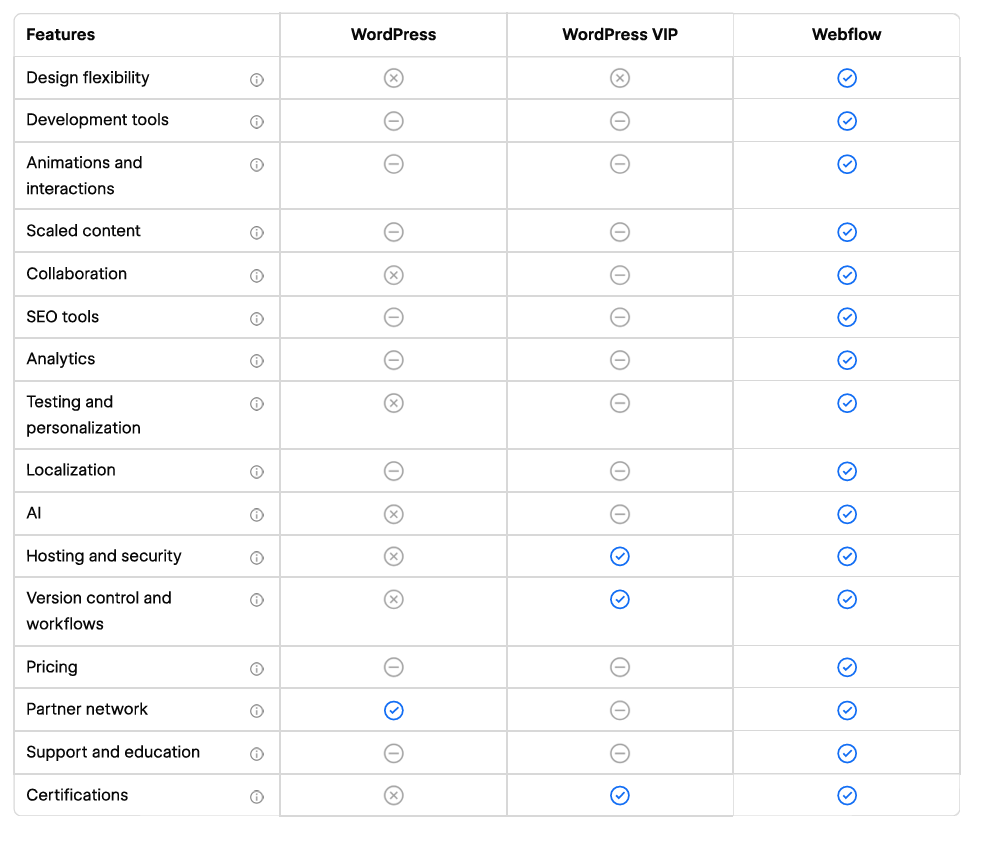
WordPress Vs Webflow - The Comparison
This comparison chart is from Webflow, so it's naturally favourable, but we agree with its points.
Are There Downsides to Webflow?
Yes, nothing is perfect.
Using a template allows you to edit content easily. However, bespoke designs require "Designer" access, which has a cost and learning curve.
There are also limitations on the number of collections, items per collection, and fields per collection within the CMS.
In practice, this means:
- You can only have up to 60 editable fields per CMS page.
- You can have up to 10,000 posts per collection.
- There's a limit to the number of collections you can create.
These limitations are unlikely to be an issue for most websites. We've not maxed out these limits in our website builds yet.
Why Choose Webflow?
Webflow sites offer better aesthetics and are easier to manage. If you want to work with us, we no longer work with WordPress. Migrate with us, or we can recommend some excellent WordPress agencies.